Trade review
Review every trade like game film.
Atium Bot drafts the trades you place, and once you save them they wait in your review queue. Atium gives each one a structured review, a second opinion when you want one, and a weekly focus from the Film Room.

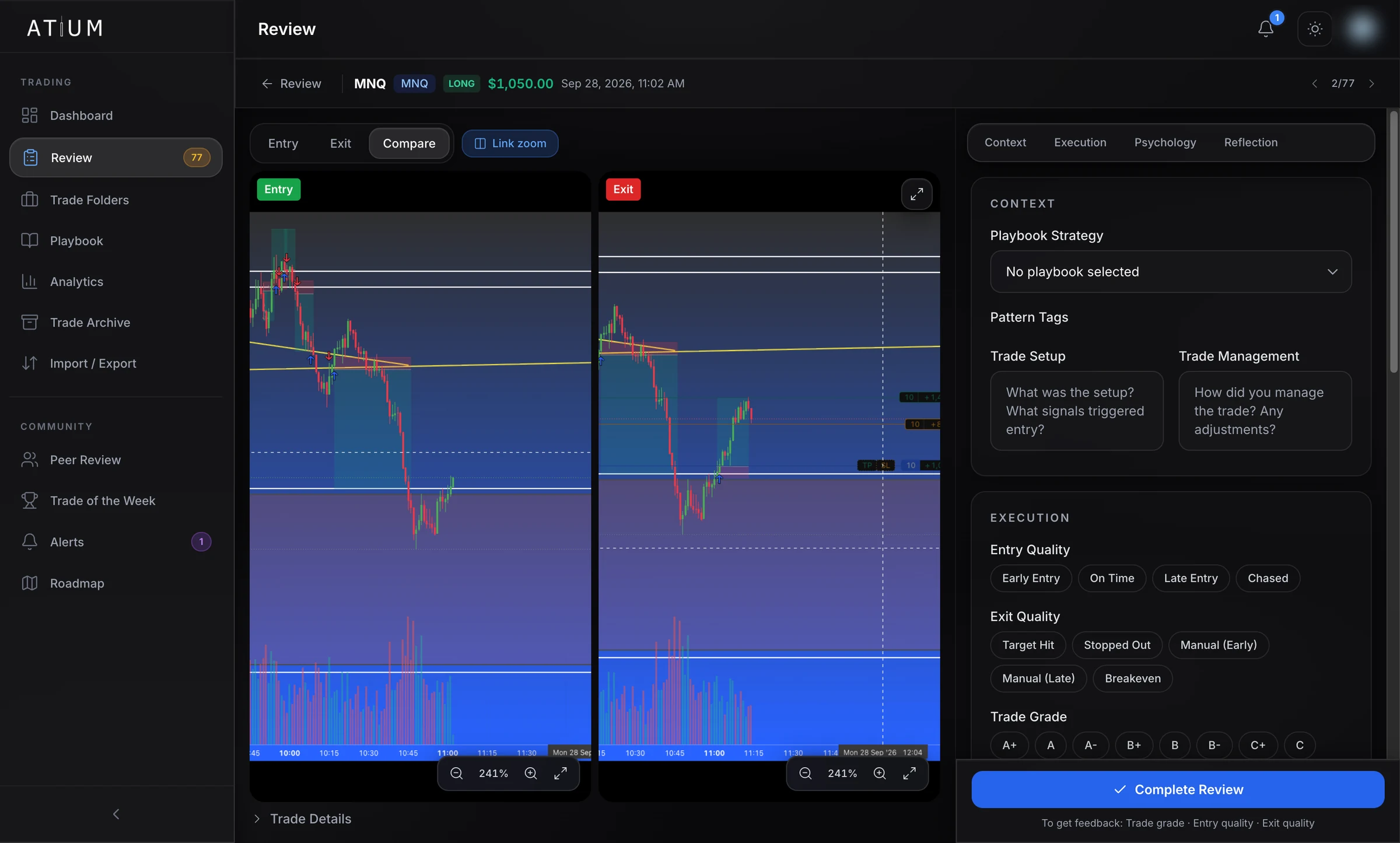
Illustration with simulated data of reviewing a trade in Atium. A long MES trade, 3 contracts, entry 6,620.00, stopped out at 6,616.00 for −$60.00, lands in the Review queue and the to-review count goes from 2 to 3. The review room opens on Compare with the entry and exit screenshots side by side; with Link zoom on, both zoom in together. An arrow is drawn at the entry and a horizontal line at the stop. In the Execution section, entry quality is set to On Time and exit quality to Stopped Out, which fills the stop loss from the exit price; the risk box shows $60.00, 4 points × $5.00 per point × 3 contracts. The trade is graded B+. Complete Review then opens with two choices, archive privately or get feedback, and one Discord server is picked for feedback.
Illustrative demo · simulated data
1 · The queue
Every trade waits for you in one place
- j and k move to the next and previous trade
- Every change saves as you go, and ⌘S saves on the spot
- Live and backtest trades both come through, clearly marked
I drafted it, you saved it — it's in your queue.
2 · Compare and annotate
Entry and exit, side by side
- Draw on your screenshots: pen, line, arrow, rectangle, horizontal S/R line and text
- Your drawings are a layer you can show or hide, separate from the original image
- Open any screenshot full screen to zoom and pan
Charts by TradingView
3 · Grade the execution
Grade it honestly, win or lose
- Entry quality: early, on time, late or chased
- Exit quality: target hit, stopped out, manual early or late, or breakeven
- Add your stop and the risk is worked out in dollars, showing its maths. That unlocks R-multiples for the trade
- Mark it stopped out and the stop fills in from the exit price
4 · Psychology and reflection
Write down what was going on in your head
- Your own mindset, emotion and tag lists, with sensible defaults
- Link a playbook strategy and tag the patterns you traded
- Your mistakes, lessons and improvements feed the Film Room's weekly write-up
5 · Finish it your way
Archive it, or ask for a second opinion
- Getting feedback needs a grade, entry and exit quality and at least one screenshot. Archiving needs nothing
- Other members see your result in R, ticks or %, not your dollar P&L or position size
- A post in a Discord server can still show your dollar result and size, so choose the server with that in mind
6 · Second opinions
See what other traders would have done
- Up to three reviews per trade, each with a suggested grade
- Feedback on setup, entry, exit and management
- Each reviewer's drawings are their own layer, so you can toggle them one by one
- Rate each review from 1 to 5
- As peer grades come in, Atium shows how your own grades compare with theirs
Reviewers need an Atium membership and a linked Discord account. Atium Bot doesn't send DMs, and there's no official Atium server: it posts in servers whose admins add it and run /atium setup.
7 · Film Room
One focus for next week
- Written from the notes in your own reviews and the peer feedback you received
- Covers live trades only, so backtests never skew it
- No notes that week? You still get the numbers
Illustration with simulated data of a weekly Film Room report: gross P&L +$1,245.00, win rate 58% (7 wins, 5 losses), 11 of 12 trades reviewed, plan adherence 82%, average 0.42R across 10 of 12 trades; grades: 2 A, 4 B+, 3 B, 1 C+, 1 D, average B; best trade MNQ +$420.00, worst NQ −$310.00. The AI-written Film Review's one focus for next week: "Wait for the 5-minute close before adding size." with recurring mistakes and lessons drawn from the trader's own review notes.
Illustrative demo · simulated data
Where your review goes
Every review makes your analytics sharper
Nothing you fill in is a dead end. Each part of the review feeds a part of Atium.
Grades and psychologyPsychology analytics
Your grades, mindset, emotions, confidence and plan adherence, set against your results, so you can see which states you trade best in.
Your stopR-multiples
Risk worked out from the stop turns every result into R, for average R and R-multiple analytics across trades of any size.
Strategy and pattern tagsPlaybook stats
Link a playbook strategy and tag the patterns you traded, and each strategy keeps its own trade count, win rate and P&L.
FAQ
Questions about trade review
Start reviewing your trades properly
Start your 14-day free trial. A card is required to start, and you pay nothing if you cancel before the trial ends.